Народ, а есть софтина open source для записи дисков типа k3b или brasero?
LinuxForum.Fans
Все о Mac OS X, обсуждение и не только
Автор: kOvr1K
239 сообщений
80474 просмотров
Народ, а есть софтина open source для записи дисков типа k3b или brasero?
http://burn-osx.sourceforge.net/Pages/English/home.html
http://www.opensourcemac.org/
А вот мне интересно есть ли свободный Аудио/МИДИ редактор?
Платные то я знаю
Cubase, Live и свой родной Logic с Garage Band'ом
i2ks, спасибо, кое-что еще пригодилось :)
Народ, кто знает как поставить gcc на Мак?
Делал так:
[console]aleksandr-makurins-macbook-pro:~ aleksandrmakurin$ sudo port search gcc
Password:
apple-gcc33 @1823 (lang)
Apple's version of gcc 3.3
apple-gcc40 @5465 (lang)
Apple's version of gcc 4.0
apple-gcc42 @5531 (lang)
Apple's version of gcc 4.2
apple-gcc42-devel @5564 (lang)
Updated version of Apple's version of gcc 4.2
arm-aout-gcc @3.3.6 (cross, devel)
gcc cross-compilers for arm-aout, with newlib runtime library.
arm-elf-gcc @4.3.2 (cross, devel)
gcc cross-compilers for arm-elf, with newlib runtime library.
arm-elf-gcc3 @3.4.6 (cross, devel)
gcc 3.x cross-compilers for arm-elf, with newlib runtime library.
arm-none-linux-gnueabi-gcc @2005q3-2 (cross, devel)
gcc 3.x cross-compilers for arm-none-linux-gnueabi.
arm-rtems-gcc @4.2.3 (cross, devel)
gcc cross-compilers for arm-rtems, with newlib runtime library.
avr-gcc @4.0.2 (cross, devel)
gcc cross-compilers for avr
gcc33 @3.3.6 (lang)
The GNU compiler collection
gcc34 @3.4.6 (lang)
The GNU compiler collection
gcc40 @4.0.4 (lang)
The GNU compiler collection
gcc41 @4.1.2 (lang)
The GNU compiler collection
gcc42 @4.2.4 (lang)
The GNU compiler collection
gcc43 @4.3.4 (lang)
The GNU compiler collection
gcc44 @4.4.4 (lang)
The GNU compiler collection
gcc45 @4.5.0 (lang)
The GNU compiler collection
gcc46 @4.6-20100508 (lang)
The GNU compiler collection, prerelease BETA
gcc_select @0.1 (sysutils)
Switch the default compiler
gccmakedep @1.0.2 (x11, devel)
Create dependencies in makefiles using 'gcc -M'
gccxml @0.6.0 (lang)
generates XML description of C++ code
gccxml-devel @20090713 (lang)
generates XML description of C++ code
gnat-gcc @4.4.2 (lang)
The GNU compiler collection with GNAT
i386-elf-gcc @4.3.2 (cross, devel)
gcc cross-compilers for i386-elf, with newlib runtime library.
i386-mingw32-gcc @3.4.5-20060117-2 (cross, devel)
Mingw32 cross-compiler for i386-Win32
i386-rtems-gcc @4.2.3 (cross, devel)
gcc cross-compilers for i386-rtems, with newlib runtime library.
i960-rtems-gcc @3.2.3 (cross, devel)
gcc cross-compilers for i960-rtems, with newlib runtime library.
lcov @1.8 (devel)
LCOV is a graphical front-end for GCC's coverage testing tool gcov.
llvm-gcc42 @2.6 (lang)
llvm is a next generation compiler infrastructure
m68k-elf-gcc @3.4.6 (cross, devel)
gcc cross-compilers for m68k-elf, with newlib runtime library.
m68k-rtems-gcc @4.2.3 (cross, devel)
gcc cross-compilers for m68k-rtems, with newlib runtime library.
mips-elf-gcc @3.4.6 (cross, devel)
gcc cross-compilers for mips-elf, with newlib runtime library.
mips-rtems-gcc @4.2.3 (cross, devel)
gcc cross-compilers for mips-rtems, with newlib runtime library.
mipsel-linux-gcc34 @3.4.6 (cross)
gcc cross compiler for mips-linux with uClib
powerpc-rtems-gcc @4.2.3 (cross, devel)
gcc cross-compilers for powerpc-rtems, with newlib runtime library.
py26-pygccxml @1.0.0 (python, devel)
pygccxml is a python interface to gcc-xml
sh-rtems-gcc @4.2.3 (cross, devel)
gcc cross-compilers for sh-rtems, with newlib runtime library.
sparc-rtems-gcc @4.2.3 (cross, devel)
gcc cross-compilers for sparc-rtems, with newlib runtime library.
Found 39 ports.
aleksandr-makurins-macbook-pro:~ aleksandrmakurin$ sudo port install gcc46
---> Computing dependencies for gcc46Error: Unable to execute port: can't read "build.cmd": Failed to locate 'make' in path: '/opt/local/bin:/opt/local/sbin:/bin:/sbin:/usr/bin:/usr/sbin' or at its MacPorts configuration time location, did you move it?
Before reporting a bug, first run the command again with the -d flag to get complete output.
[/console]
[console]aleksandr-makurins-macbook-pro:~ aleksandrmakurin$ sudo port install apple-gcc42
---> Computing dependencies for apple-gcc42
---> Configuring apple-gcc42
Error: Target org.macports.configure returned: configure failure: shell command " cd "/opt/local/var/macports/build/_opt_local_var_macports_sources_rsync.macports.org_release_ports_lang_apple-gcc42/work/build" && /opt/local/var/macports/build/_opt_local_var_macports_sources_rsync.macports.org_release_ports_lang_apple-gcc42/work/gcc_42-5531/configure --prefix=/opt/local/lib/apple-gcc42 --enable-languages=c,objc --program-suffix=-apple-4.2 " returned error 1
Command output: loading cache ./config.cache
checking host system type... i386-apple-darwin9.7.0
checking target system type... i386-apple-darwin9.7.0
checking build system type... i386-apple-darwin9.7.0
checking for a BSD compatible install... /usr/bin/install -c
checking whether ln works... yes
checking whether ln -s works... yes
checking for gcc... /usr/bin/gcc-4.0
checking whether the C compiler (/usr/bin/gcc-4.0 -arch i386 ) works... no
configure: error: installation or configuration problem: C compiler cannot create executables.
Error: Status 1 encountered during processing.
Before reporting a bug, first run the command again with the -d flag to get complete output.[/console]
ST, тебе нужен xcode :-)
To install the gcc compiler, download the xcode package from http://connect.apple.com/. You’ll need to register for an Apple Developer Connection account. Once you’ve registered, login and click Download Software and then Developer Tools. Find the Download link next to Xcode Tools (version) – CD Image and click it!
Find the downloaded package, doubleclick it and follow the installation instructions to install gcc and a host of other development applications. gcc will be located at /usr/bin/gcc.
Websites tend to change over time, so if you notice that the steps to download xcode have changed, please post a comment and I’ll update the recipe.
Я первый задам тупой вопрос?) Что лучше и быстрее mac или linux ?
4ellUniX,
ох) Если будете брать макбук - то мак быстрее. если обычный ноут, то наверное грамотно настроенаня дженту или арч - бьыстрее хакинтоша.
ох) Если будете брать макбук - то мак быстрее. если обычный ноут, то наверное грамотно настроенаня дженту или арч - бьыстрее хакинтоша.
Мак физически не может быть быстрей... Потому что микроядро на i386/amd64 слишком часто требует переключения контекста исполнения. Вопрос лишь в оптимизации компонентов системы под железку и вообще исключения быдло-кода из прикладного софта.
Мак физически не может быть быстрей
цифры цифры и голые факты в студию, а не аргументы с потолка
цифры цифры и голые факты в студию, а не аргументы с потолка
Не не... что все от меня то требуют? Лучше Вы мне расскажите, знаете ли вы хотя бы одного человека, который для организации ДЕЙСТВИТЕЛЬНО нагруженных систем с большими обрабатываемыми/пропускаемыми объёмами данных использовал ось от Apple?
Типа роутера на, хотя бы, 1Mpps? Умельцы на фряхе это ещё года два назад практиковали wink
сразу видно человек не знаком с осью)
сразу видно человек не знаком с осью)
А я разве говорю что нибудь о том, что ось плоха? Недостатки микроядра трудно заметить при работе с тем же кодированием видео. Скорее упрёшься в производительность жёсткого диска... А вот nat в 1Mpps - вот это достойная задача wink
Если кому интересно- список бесплатного ПО для MacOS. Удобный интерфейс и возможность загрузки приложений непосредственно из окна программы. Список довольно обширный. Есть программы как знакомые каждому линуксоиду, так и предназначенные исключительно для MacOS.
http://www.freewarepub.eu/kidifree/

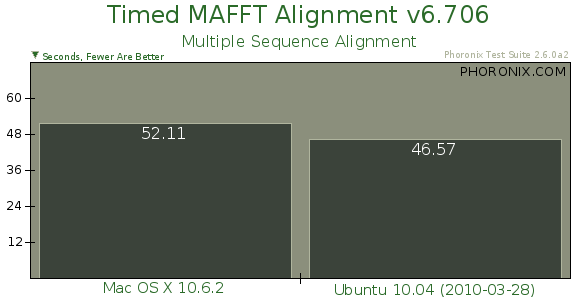

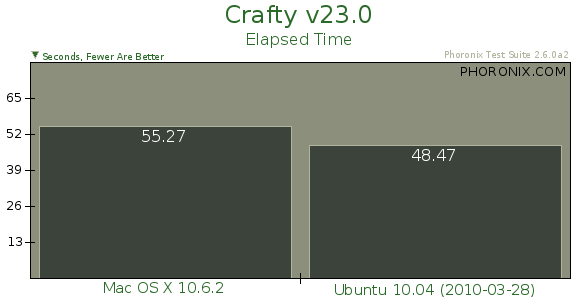


Хотя справедливости ради нужно отметить, что в некоторых задачах маки всё же побыстрее.
Ставил мак ос х на виртуалку - посмотреть. Не понравилась, неудобная какая-то, но м.б. это только на первый взгляд, т.к. использовал ее в течение пары часов.
Когда узнал о существовании линукса помимо винды - от компьютера оторваться было невозможно.
За мак осью такого не почувствовал.
MacOS- ось для работы. Там нет необходимости что-то настраивать в самой системе. Просто ставится нужный софт и все. Соответственно, в системе копаться довольно скучно. В отличии от Windows или Linux, в MacOS существует не так много способов настройки системы "под себя", но если привыкнуть к тому, что есть, то работать- одно удовольствие. Мне в ней нравится сочетание простоты интерфейса со стабильностью работы и мощью консоли UNIX
мак изначально настроен а отличие от венды... пользоваться макосью намного интереснее чем вендой и немного интереснее чем линуксом (имхо). уважаемый mail765754I, счел ее неудобной ибо пользовался ей на виртуалке и неизвестно какую версию он ставил... вожет он какую-нибудь MacOS X 10.3 поставил... (последняя 10.6.4). мне нравится.
зы: временно с венды:(
уважаемый mail765754I, счел ее неудобной ибо пользовался ей на виртуалке
Не вижу большое разницы чтобы с ней познакомиться.
неизвестно какую версию он ставил
10.6.3
Войдите или зарегистрируйтесь, чтобы ответить.
